The graph
The Graph tab is an infinite canvas. A node reads fields from its left-side inputs, applies its controls, and exposes results from its right-side outputs.
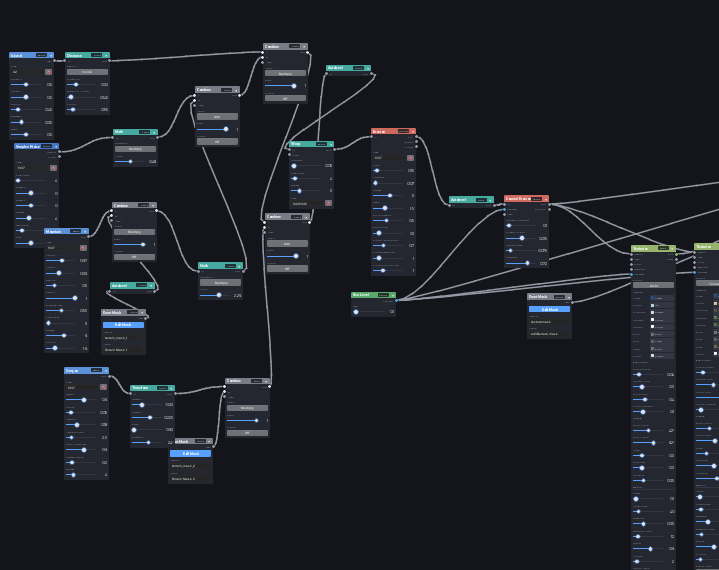
Add and arrange nodes
Use the palette search on the right, then select a node to place it at the center of the current view. Drag a node by its header. Pan the canvas through empty space and use the canvas zoom controls or wheel gesture available in Studio.
Delete a node with its header close button. Removing a node also removes its connected wires.
Use category colors as landmarks: generators begin a graph, modifiers and simulations reshape it, Derive nodes measure it, and Materials nodes prepare the channel consumed by Build Map. The node reference can be filtered by port type when you are unsure what can connect next.
Connect nodes
Drag from an output socket to a compatible input socket. Inputs accept one wire; connecting a different source replaces the previous wire. Heightfield, Material, and Sea Level ports only accept their matching type. Universal Any ports adopt the connected type where supported.
Only nodes that contribute to a requested preview or Build Map are evaluated. Expensive nodes display their latest evaluation time in the header.
Undo and redo
Use Atlas Studio's Undo and Redo buttons or the registered Studio actions. A parameter gesture, node drag, wire edit, or completed paint stroke is one undo step. Atlas integrates these edits with Studio's change history so Atlas and ordinary Studio edits remain chronological.
Changing projects clears graph undo history because it replaces the active document.